Key takeaways
- Zalando, Amazon, Otto, Breuninger, Mytheresa, Google Shopping and your own shop all want the same product in a different frame: ratio, background, margins, view order, file name.
- Most marketplace rejections are not about the photography. They are about the frame, the name and the count.
- The way out is one approved master per look and one export per channel, not one shoot per channel.
- Each channel now also says something about AI-generated imagery, and each says something different. The mark has to survive your own pipeline.
A fashion e-commerce team rarely has too few pictures. It has pictures in the wrong shape. The look is approved, the model is right, the garment is right, and the same picture still cannot go to Zalando, Amazon, Otto and the brand's own shop as it is. One wants a tall portrait on light grey, one wants pure white with the product filling most of the frame, one wants a landscape-friendly ratio and a cropped product first, one wants the hero on the brand's own backdrop. Marketplace image requirements are where good photography goes to get rejected.
This article is about the pattern, not the fine print, which the channels update several times a year. It covers why the same picture fails from one channel to the next, what an approved set can be turned into without new photography, what has to be produced again, and how to keep the AI-generated mark on a file all the way to the product page. It is written from the side of a team that delivers these files every week, and it is not legal advice.
Every channel, a different frame
Put the main destinations of a European fashion brand side by side and the problem is visible before any picture is taken.
| Destination | What it asks for, in short | What usually fails |
|---|---|---|
| Own shop | The brand's own ratio, backdrop and crop, often the most editorial of all | Nothing, which is why teams start here and then discover the others |
| Zalando | A tall portrait at a fixed ratio, light grey behind packshots, a minimum set of views, no mannequins, no text on the image | Ratio off by a rounding, missing views, visible mannequin parts |
| Amazon | Pure white main image with the product filling most of the frame, apparel on a model for adults and flat for children, up to a set number of images | Too much space around the product, wrong background, wrong first image |
| Otto | A cropped product image on white without shadows as the main or first detail image, a different preferred ratio, plain file names | Umlauts and special characters in file names, shadows under the product |
| Breuninger, Mytheresa and other premium retailers | Their own house framing and naming, which can differ from the brand's own hero | A hero that is right for the brand and wrong for the retailer's grid |
| Google Shopping and social | The feed's own image attributes, and AI-generated images carrying the right metadata | Metadata stripped on the way, so the feed cannot read what the file is |
Every row is a reasonable rule on its own. Together they mean a picture is never "done" once. It is done per destination.
The data — Zalando's partner image guidelines, updated in October 2026, state that "ratios of 1.445 or 1.446 will be rounded to 1.45, which will be marked as an incorrect aspect ratio". Amazon's main-image rule, as documented by Jungle Scout, asks for the product to fill at least 85 percent of a pure white frame. Two rules, two numbers, and the same approved picture cannot satisfy both as one file.
Why pictures that already exist still get rejected
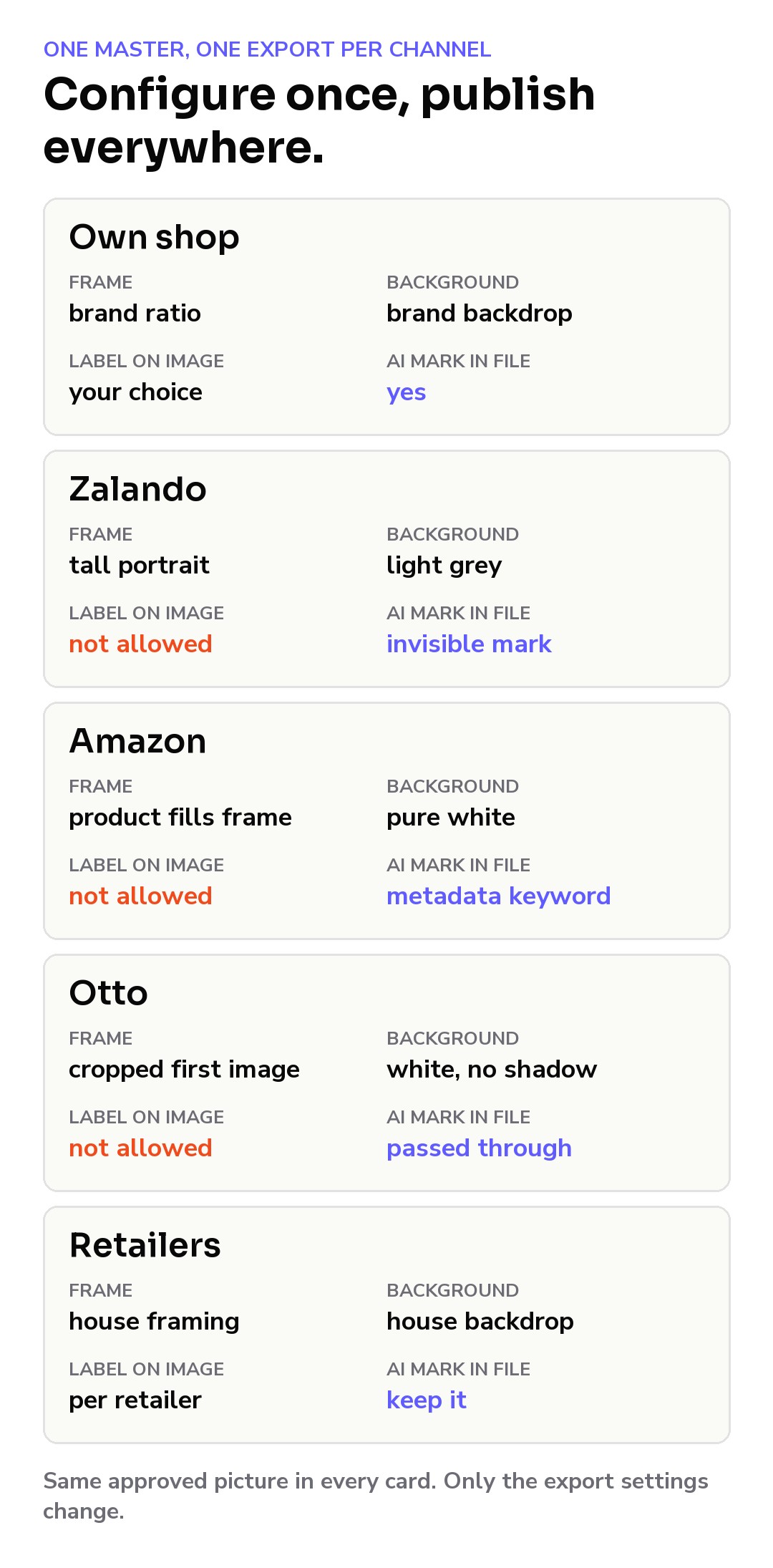
The pattern we see most often: a brand sends a complete set from its own shop to a marketplace, and a large share comes back. Not because the model, the light or the garment are wrong, but because the frame is. One channel rounds the aspect ratio and refuses the wrong value. Another measures how much of the frame the product fills. A third rejects a file name with an umlaut in it before anyone looks at the picture. A fourth counts the views and rejects the article because the back is missing.
None of this is about photography quality, and most of it can be checked by a script before upload. The expensive mistake is treating each channel as a new shoot. The cheaper habit is treating the approved look as a master and each channel as an export with its own crop, margins, resolution, name and metadata. A new channel is then a new configuration, not a new production.
What one approved set can become
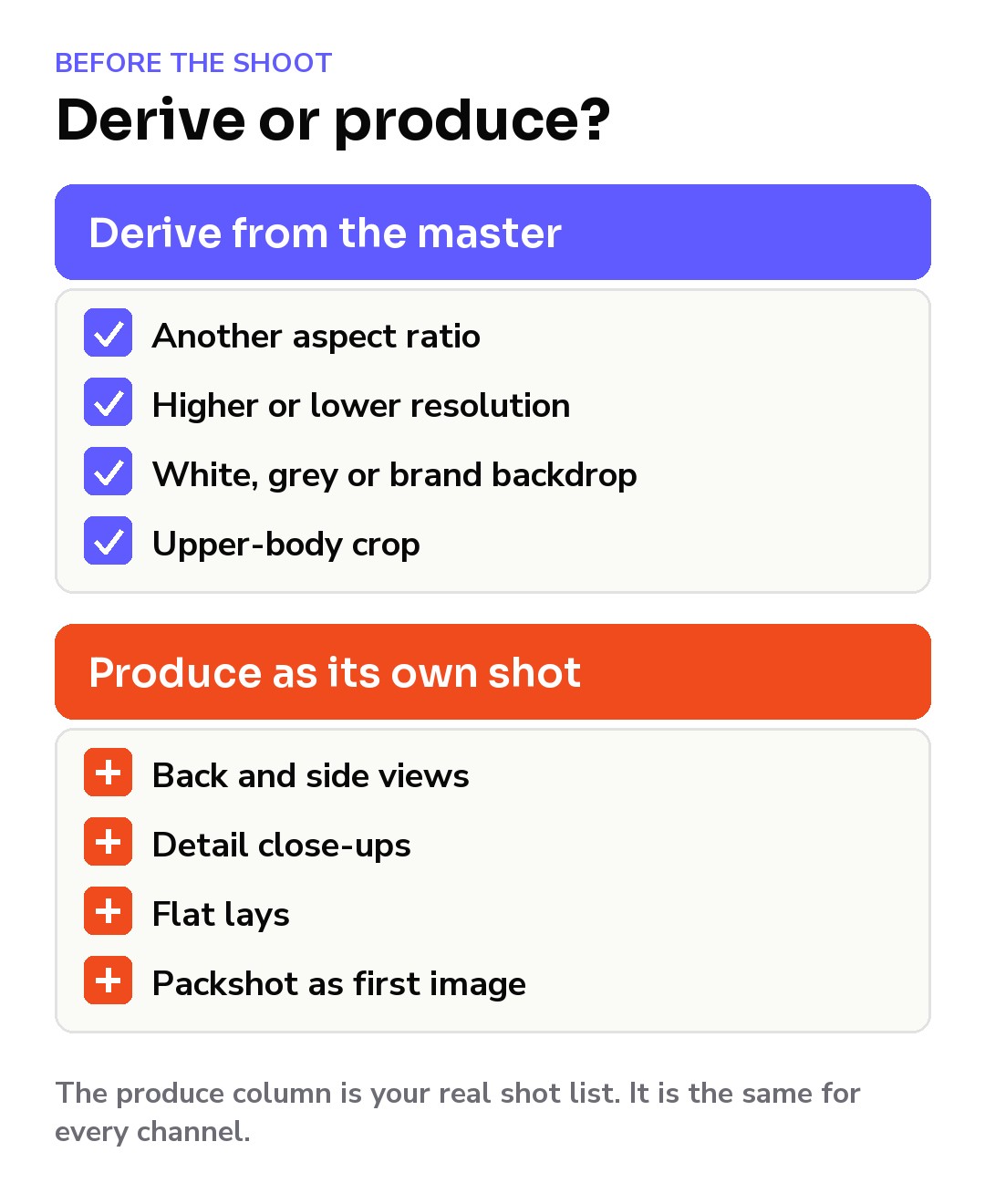
An approved on-model set is a master, not a deliverable. Some exports from it are mechanical; others are new pictures, however similar they look.
Derived from the master
- Aspect ratio. A full-body look produced with generous margins can be re-framed to a tall portrait, a 4:3 frame or a white main image with a fill rule, by cropping or extending a flat backdrop. The margins are decided before generation, not after.
- Resolution. A master produced at the largest size any channel needs covers all of them without upscaling.
- Background. On a flat studio backdrop, white, light grey and a brand grey are a backdrop change on the same subject. The product pixels do not move.
- Upper-body crops. Cut from a high-resolution full-body master once the framing rule is known.
Produced, not stretched
- Back and side views. No crop of a front view gives you a back. These are separate shots with their own pose and margins.
- Detail close-ups. A detail is only worth having at native resolution. Zooming into a full body gives a soft picture, and some channels reject blur outright.
- Different framing rules. Where a channel wants children's apparel flat and adult apparel on a model, a flat lay and an on-model picture are two productions, not two exports.
- Hero and sequence. When a channel wants the cropped product first and the model later, the first image is a packshot, a different picture from the on-model hero.
A useful exercise before any production: list every channel, write its mandatory views in a row, and mark each cell "derive" or "produce". The "produce" column is the real shot list. In our experience it is shorter than teams fear, and it is the same list whether the pictures come from a studio or from AI.
A naming template that survives every channel: view order in the name, no accents, no spaces.
style_colour_view.jpg

AB1234_BLK_01.jpg  front
AB1234_BLK_02.jpg  back
AB1234_BLK_03.jpg  detail
Before every upload
- Ratio and size match the channel.
- Background matches the channel.
- Mandatory views are all there, in the right order.
- File names follow the template.
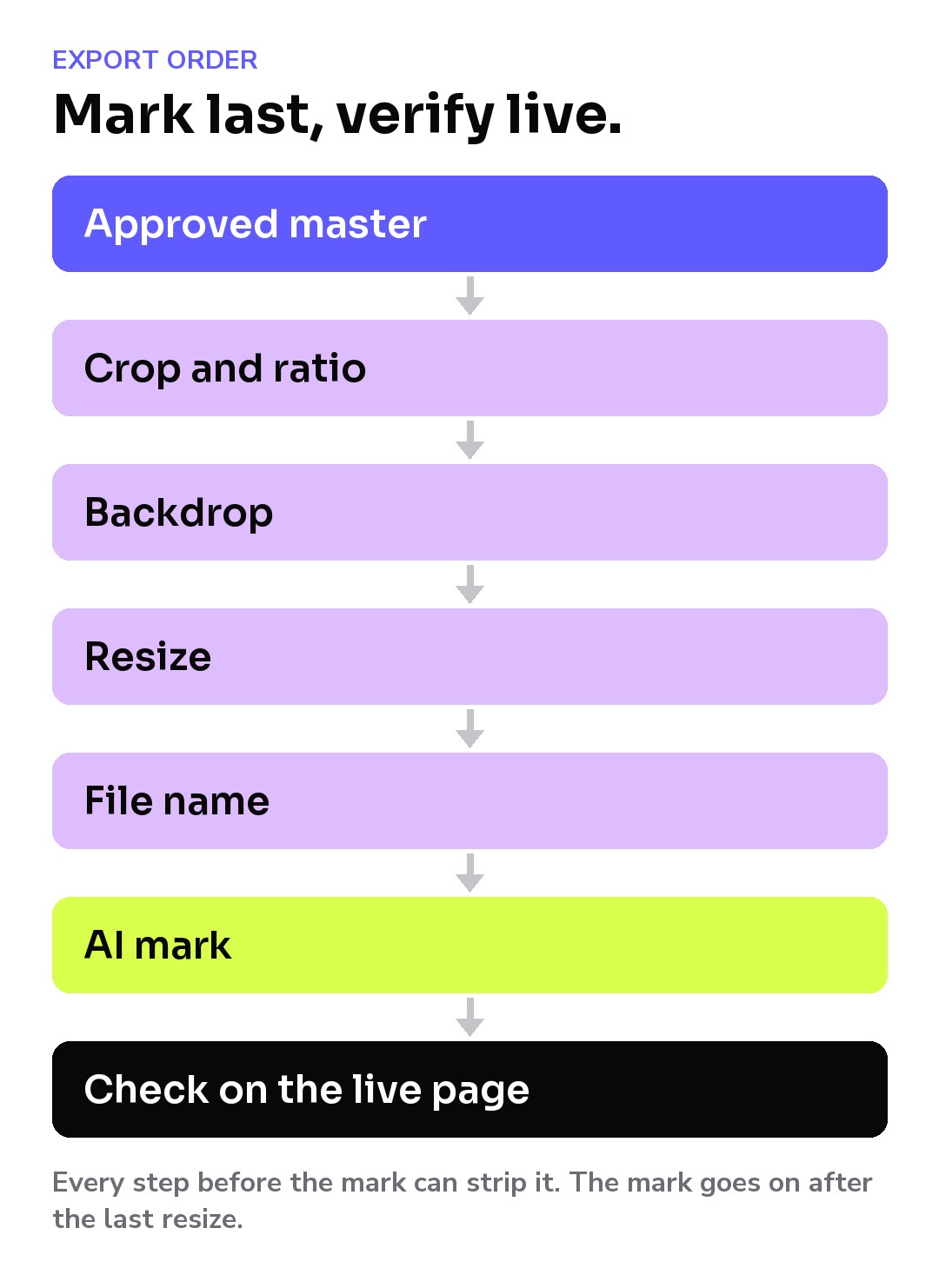
- The AI mark is applied last, after the final resize.
The AI label is now part of the spec
Since 2 August 2026, the EU AI Act's Article 50 transparency obligations apply, according to the European Commission's FAQ: providers of generative AI systems must mark outputs in a machine-readable way, and the brand publishing the picture may carry a disclosure duty on its own channels, depending on how the content is classified. How that lands on a product page is a question for your counsel. What the channels have already decided is visible in their rules:
- Zalando does not allow text overlays or watermarks on the image and asks for invisible marking in the metadata or in the pixels, kept "so it isn't stripped during upload".
- Amazon, per its July 2026 notice reported by GeekSeller, asks sellers to tag photorealistic AI-generated people with a keyword in the file's XMP metadata, and displays its own disclosure.
- Google Merchant Center asks merchants to keep the IPTC digital source type tag on AI-generated images and not to remove embedded metadata.
- Otto, through its channel integration documentation, passes EXIF and XMP metadata through to the channel if the file was marked before upload.
Four channels, four different answers, and one common denominator: the metadata must still be on the file when it lands. In practice it often is not. A resize, a "save for web", a storefront upload or a retoucher's export produces a new file, and the mark goes with the old one. The rules we follow are simple: apply the mark as the last step of every export, use more than one layer so they fail in different ways, keep the visible label a per-channel decision, and pull a published file back from the live page to verify that the mark survived your DAM, your PIM export and your CDN.
How Sartiq handles it
The approved picture is produced once. Each marketplace sets its own technical and editorial standards, and those are configured per destination, so the same approved shot exports with the right crop, margins, resolution, naming convention and metadata for each one: the own shop, Zalando, Amazon, Otto, a premium retailer's grid or a product feed. Every output carries three marking layers applied automatically: C2PA Content Credentials, EXIF and XMP metadata, and an imperceptible watermark. A visible "AI Generated" label is available, rendered onto delivered files before they reach your pipeline and toggled per channel. An open API delivers approved images back out in your naming convention, at your resolutions, with your metadata. Adding a channel is adding a configuration, not booking a shoot.
Key points to remember
- Zalando, Amazon, Otto, Breuninger and your own shop want the same product in different frames. Plan for that before the first picture, not after the first rejection.
- Treat the approved look as a master and every channel as an export: ratio, size, background, margins, naming, metadata.
- Produce the master at the largest size and widest margins any channel needs, so crops are derived, not stretched.
- Backs, details and flat lays are productions, not exports.
- File names, view counts and fill rules cause more rejections than most teams expect. Check them by script.
- The channels' AI-imagery rules differ. Mark last, use more than one layer, verify on the live page.
FAQ
Can one picture serve Zalando and Amazon? Not as one file. One wants a tall portrait on light grey, the other pure white with the product filling most of the frame. The same approved master can be exported to both if it was produced with margins to spare and at enough resolution.
Do we need a separate shoot for each marketplace? Not for the front, upper-body and background variants, which derive from a master produced with the right margins. Backs, sides, details and flat lays are separate productions whichever channel asks for them, so plan them once and export them everywhere.
Does an AI label have to be visible on the product picture? It depends on the channel and on your legal reading of Article 50. Zalando does not accept on-image labels and asks for invisible marking; Amazon and Google rely on metadata fields and may display their own indicator. Your own shop is your decision. Ask your counsel; this is not legal advice.
Why did our AI metadata disappear after upload? Something re-encoded the file. Resizers, format converters and some storefront platforms produce a new file without the mark. Mark last, keep more than one layer, and verify a file pulled back from the live page.